v1.5.0 · Windows 10/11

Inline AI rewrite,
without leaving the app you're in.

Select text anywhere. Press Ctrl + Alt + G. Pick an action. Paste the result back. Free by default with local Ollama; multi-provider for speed when you want it.

New in 1.5 System-wide autocorrect fixes your typos as you type — offline, in the applications you choose, off until you turn it on.

Free to install. Paste your Lemon Squeezy license key on first launch to unlock the app. Unsigned installer; SmartScreen shows "Unknown publisher" until the build is signed. R3write is an AI system: rewrites are machine-generated and should be read before you use them — what that means in practice.

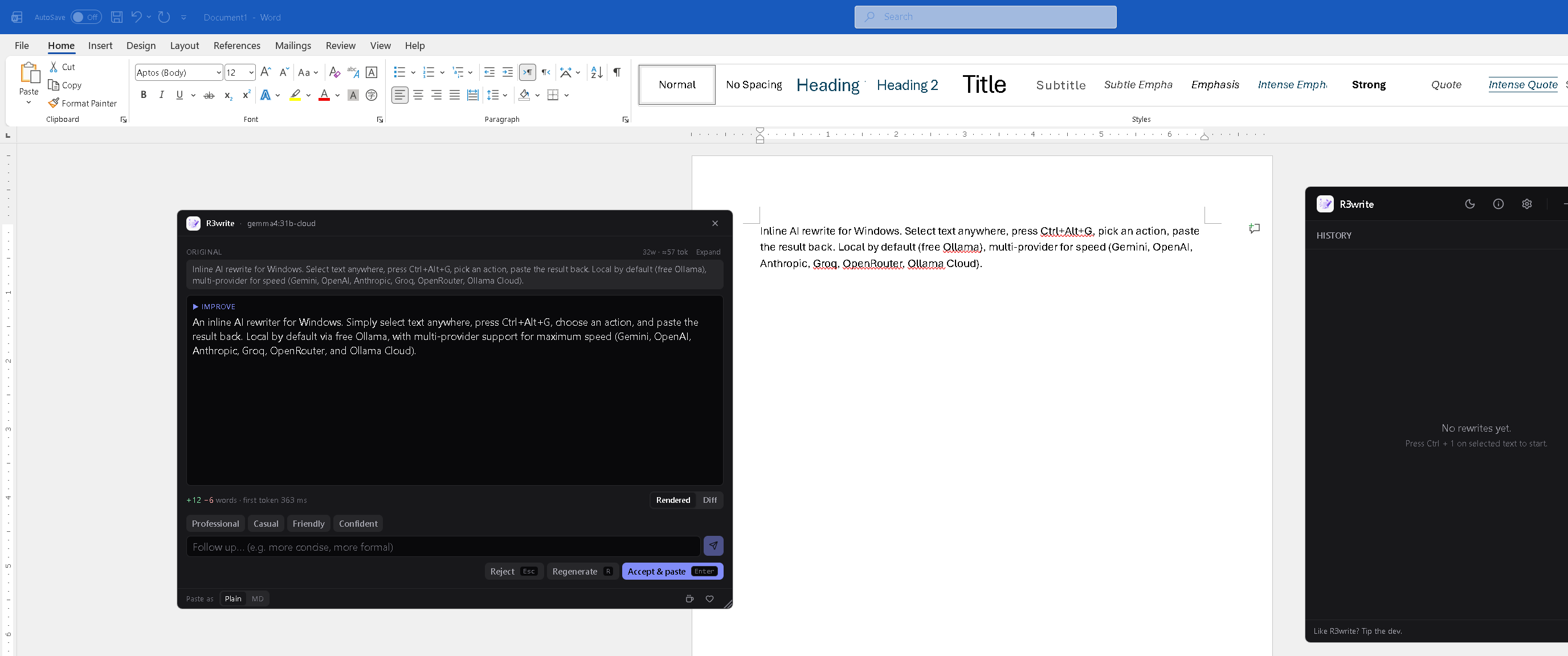
R3write popup mid-rewrite over a Word document, with the streamed Improve rewrite, +12 -6 words / first-token latency stats, follow-up tone chips, and accept / regenerate / reject pills

Select text in Word, the popup streams an Improve rewrite, you press Enter. Every keystroke without leaving the source app.

Inline, not a tab

No window-switching. The rewrite happens where you're already typing.

Free by default

Local Ollama is the zero-cost path — no key, no quota, no network.

Bring your own key

Cloud providers use your own API key, stored per-provider in Windows Credential Manager.

Word-level diff

See exactly what changed every time. Green additions, red deletions, on the same surface.

Typos fixed offline

Autocorrect runs against a dictionary bundled in the app. No network, no model, no key.

What's in it

One hotkey, any app

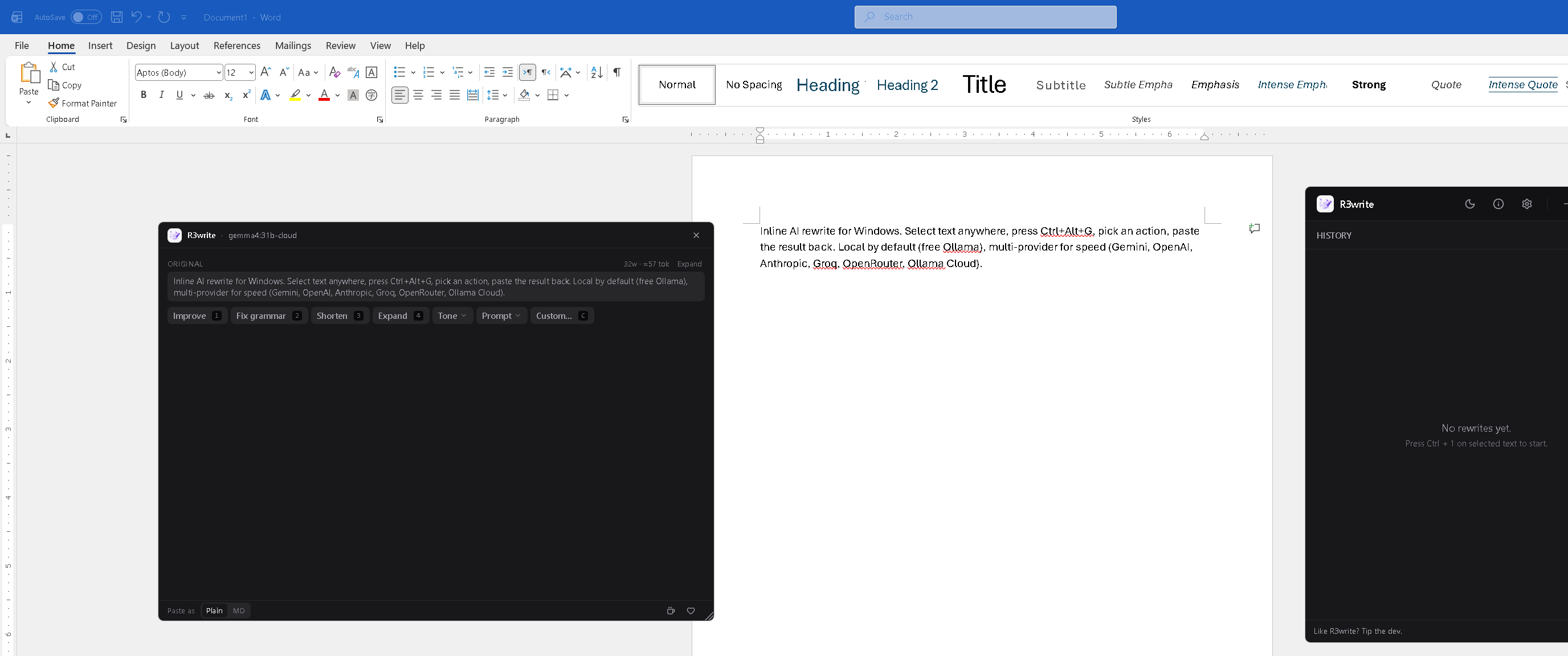
Word, Slack, browsers, code editors, terminals — anywhere there's text. The popup opens at your cursor with Improve, Fix grammar, Shorten, Expand, Tone, Prompt, and Custom actions. Each has a numeric shortcut (1–4, C) so you never need the mouse.

Repeat the same action on a new selection with Ctrl+Alt+Shift+G — no picker.

The popup action picker with all seven chips visible

Word-level diff

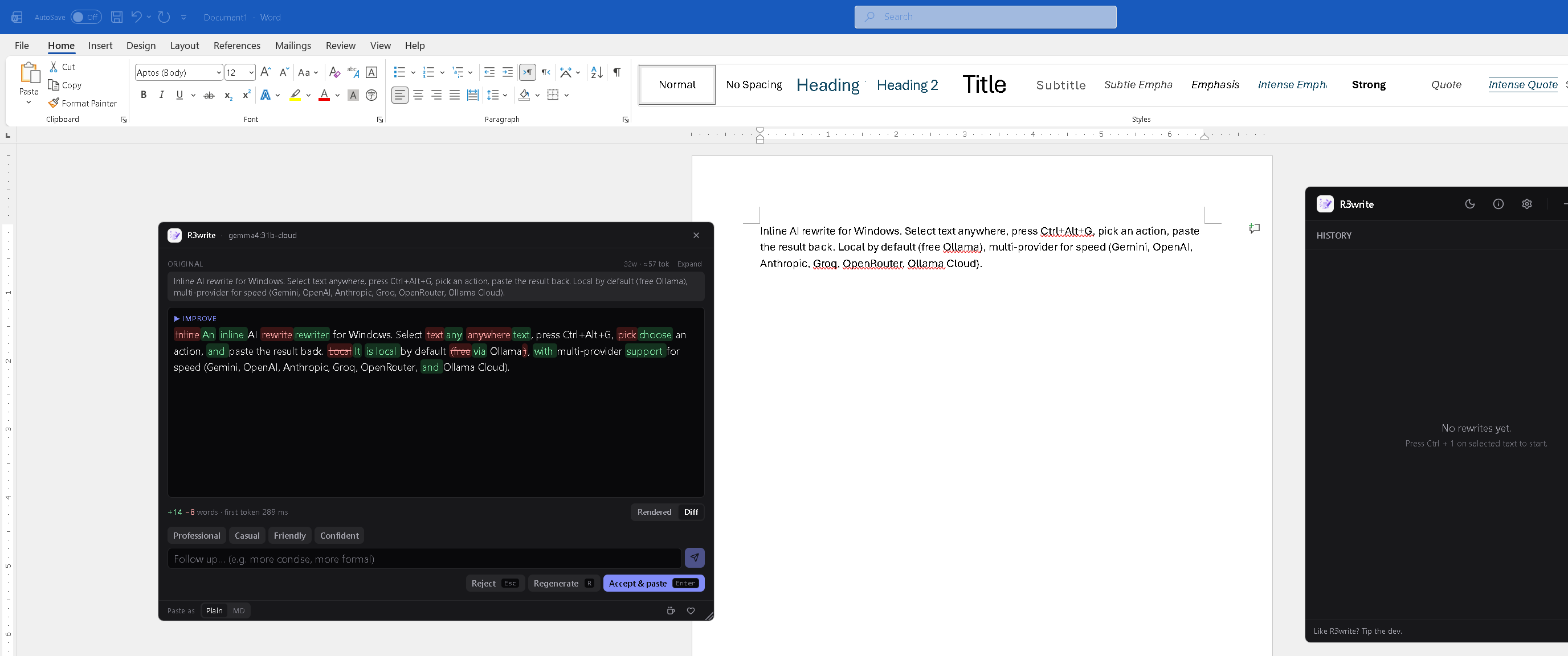
Toggle the rewrite into Diff view to see exactly what changed: green for additions, red strike-through for deletions, with a running +N -M words tally and the first-token latency.

Sanitised for both light and dark themes. Same surface as the rewrite — no extra panel, no separate compare view.

The popup in Diff view showing green word additions and red strike-through deletions

Your providers, your keys

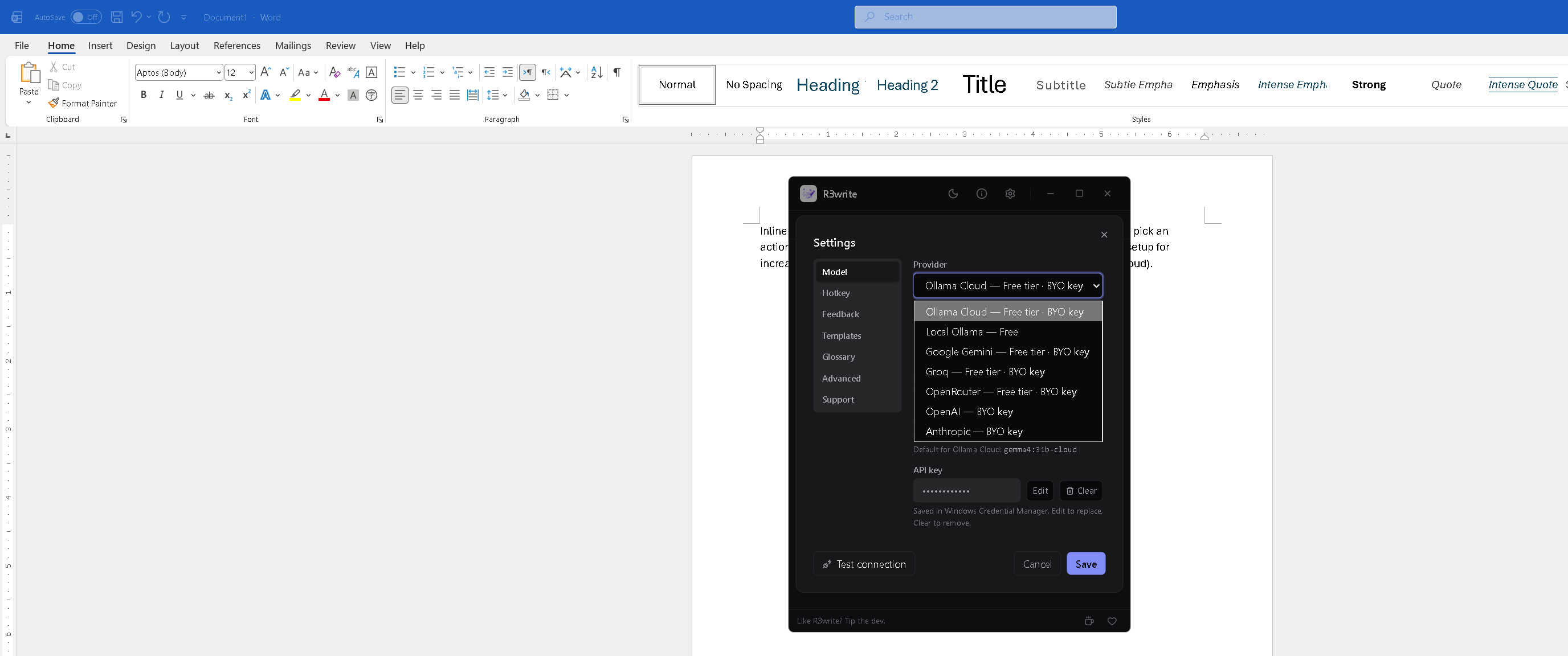
Switch the active model from a single picker. Free options up top, paid below. Each provider has its own keyring entry — switching providers doesn't blow away the others' keys.

A live status pill in the header polls the active provider every 60 s. Green when reachable, red when not.

Settings dialog with the Provider dropdown open showing all seven providers and their tier tags

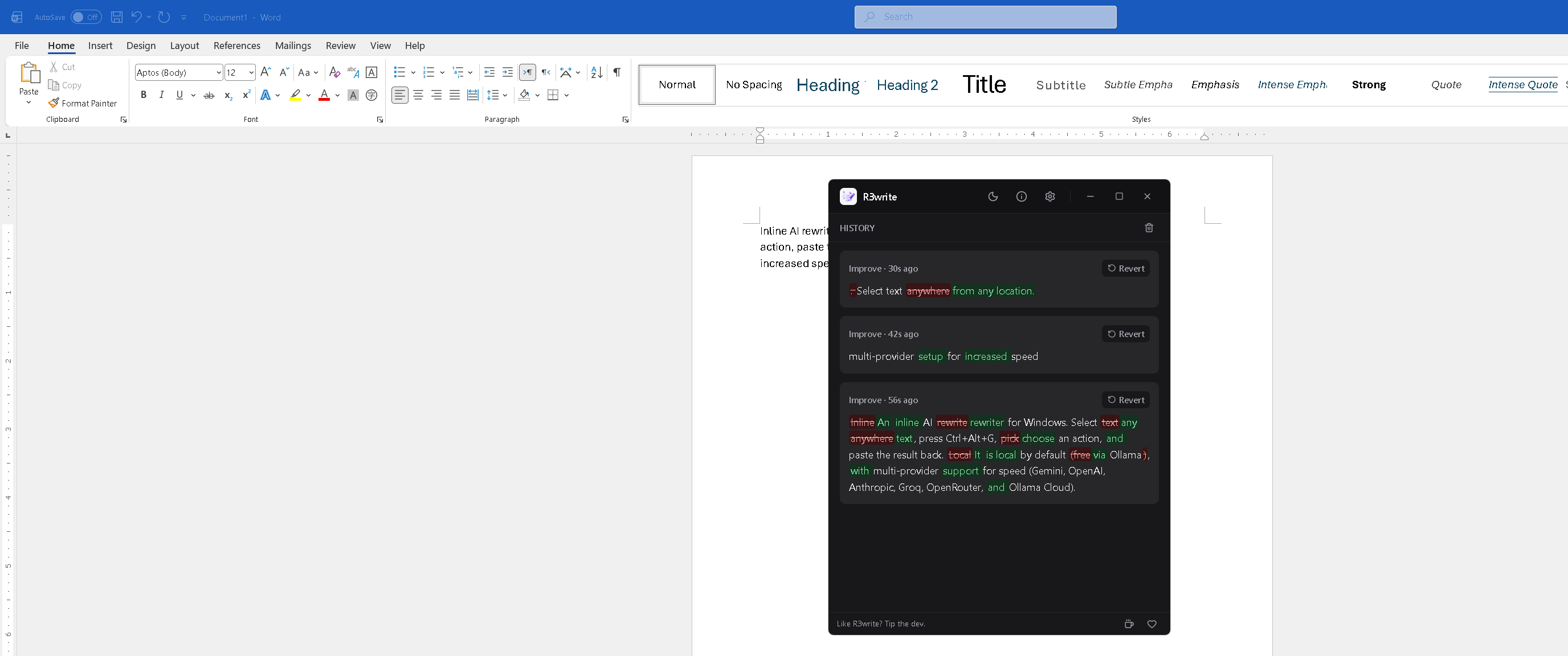
History at a glance

Last 20 rewrites, each with the action, time, word-level diff, and a one-click Revert (copies the original back to your clipboard for paste-over).

Closing the main window keeps R3write running in the system tray so the global hotkey still fires.

The main window history list with three Improve rewrites and rich diff highlighting

New in 1.5

Autocorrect, system-wide and offline

The rewrite hotkey handles the paragraph you meant to write. Autocorrect handles the word you didn't. It watches typing in the applications you list, and when you finish a word with a space, punctuation or Enter, it checks that word against a dictionary bundled inside the app — 82,833 entries, no network, no model, no key — and fixes it in place.

  • Off until you turn it on. The installer offers it on an Optional features page, unchecked. That records a preference and nothing more — the keyboard hook is never installed until the app has both an active license and an explicit switch in Settings → Autocorrect.
  • Your applications, not ours. Add apps by picking them from a list of what's running, by name, rather than knowing that Outlook is outlook.exe. The shipped list is Notepad, WordPad, Word and Outlook. Nothing outside your list is ever read.
  • Undo that expires on purpose. A toast shows the correction with an Undo button; Ctrl+Alt+Z reverts the last one whether the toast is still up or not. Both retire the moment reverting would land in the wrong place.
  • Ranked by how typos actually happen. Candidates are scored by corpus frequency weighted by the shape of the edit — transpositions and doubled keystrokes first, adjacent-key slips next. Genuinely ambiguous words are left alone, and words that look like intended plurals are never quietly made singular.
  • Keystrokes are never written to disk. The typing buffer lives in memory, is capped, and is cleared on every invalidation. Corrections — not keystrokes — are logged, and the log is yours to clear.
Notepad

Please review the report

reprot → report Undo ×
Illustration of the correction toast — bottom-right, never takes focus, fades after 4 s.

Where it refuses to run

Autocorrect fails closed. When a check can't answer, that counts as a refusal — silence is never read as permission.

Password fields

Two independent checks — the Win32 field style and a UI Automation probe. Either one saying "password" refuses, and neither being able to answer refuses too.

Elevated windows

A non-elevated app cannot send input to an elevated one, so those are skipped outright.

Remote desktop

The shadow buffer tracks local keystrokes; a remote session's text isn't local.

IME and CJK input

Composition-based input has no single committed word to correct.

Browsers and Electron apps

For now. Windows only reports "this is a password field" for native text boxes, and Chromium draws its own — so the refusal is conservative until that gap closes.

Terminals — allowed, with a warning

You can add cmd.exe or powershell.exe; they're flagged and off the default list. A shell password prompt isn't a password field, so nothing can detect it — and Enter runs the line, so a correction landing on a path or a flag executes something you didn't type.

Pick a provider

Default for new installs is Ollama Cloud. Switch anytime in Settings → Model. Legacy cloud / local settings from earlier versions migrate automatically.

Provider Tier Default model Notes
Local Ollama Free llama3.2 Runs on your machine, no key required.
Ollama Cloud Free tier · BYO key gemma4:31b-cloud Default for new installs.
Google Gemini Free tier · BYO key gemini-2.5-flash Most generous free tier of any major cloud LLM; very fast.
Groq Free tier · BYO key llama-3.3-70b-versatile Fastest streaming token rate.
OpenRouter Free tier · BYO key anthropic/claude-sonnet-4 Aggregator; many models behind one key.
OpenAI BYO key gpt-4.1-mini Paid only.
Anthropic BYO key claude-sonnet-4-6 Paid only.

AI transparency

R3write is an AI system, and it is built with AI. Both are worth saying plainly rather than leaving you to infer them.

Its output is machine-generated

Every rewrite — Improve, Fix grammar, Shorten, Expand, Tone, Prompt, Custom — is produced by a large language model, not by rules. Models restate things you didn't say, drop qualifiers that mattered, and are confidently wrong. Read the rewrite before you accept it. That is what the diff view is for.

The app says so where the output appears, not only here: the quick-edit popup carries a permanent AI-generated · review before use line.

What leaves your machine

There are exactly three paths, and you choose which are live:

  1. Local Ollama — nothing leaves. The model runs on your machine.
  2. A cloud provider — the text you selected and your prompt go to the provider you configured, using your key, over a direct connection. R3write operates no server and proxies nothing.
  3. Autocorrect's contextual check — off by default, and separate from the autocorrect switch. When on, a single confusable word plus up to 80 characters of preceding context goes to your configured provider. It can only ever suggest; applying is a button you press.

The offline autocorrect dictionary sends nothing anywhere. There is no telemetry, no analytics, and no usage reporting in any path.

R3write was built with AI

The application itself — its Rust and TypeScript, this website, and much of its documentation — was written by its author working with AI coding assistants. Every change was reviewed and is the author's responsibility, but the code is not hand-typed from scratch and saying otherwise would be misleading.

If you publish what you rewrite

Under the EU AI Act's transparency rules, text generated or materially altered by AI and published to inform the public on a matter of public interest must be labelled as such by whoever publishes it — unless a person has genuinely reviewed it and taken editorial responsibility. R3write cannot do that for you; it happens at the moment you publish.

Read the full AI disclosure →

About R3write

R3write started as a personal itch: every time I wanted to clean up a paragraph, tighten a Slack message, or rewrite a sentence I'd just typed, I'd Alt+Tab into a chatbot, paste, copy the response, switch back, and lose my train of thought. That tab-switching tax adds up — and for the small rewrites I do constantly, a 30-second chat is overkill.

R3write replaces the tab switch with a hotkey. Select text in any app, press Ctrl+Alt+G, pick an action, paste back. The rewrite happens where you're already typing.

Principles

  • Local by default. The free path uses Ollama on your machine. No network, no key, no quota.
  • Bring your own key. Every cloud provider uses your API key directly. R3write doesn't proxy anything through its own server. There is no R3write server.
  • No telemetry. R3write doesn't phone home, doesn't track usage, doesn't collect analytics.
  • Your data stays where you put it. Selections go to the provider you configured. That's it.

Get started in 30 seconds

  1. Download R3write from GitHub and run the installer.
  2. Grab a license key at the Lemon Squeezy checkout (pay what you want, $5 min) — the in-app gate has a one-click link.
  3. Paste the key on first launch to activate; then set up a provider (default Ollama Cloud, free tier).
  4. Select text in any app, press Ctrl+Alt+G, pick an action, accept & paste.
  5. Optional: turn on autocorrect in Settings → Autocorrect and add the apps you want it in.

Or build from source

git clone https://github.com/drknowhow/R3write
cd R3write
npm install
npm run tauri:dev

Prereqs: Windows 10/11 · Node ≥ 20 · Rust stable + MSVC Build Tools · WebView2.