v1.4.0 · Windows 10/11

Inline AI rewrite,
without leaving the app you're in.

Select text anywhere. Press Ctrl + Alt + G. Pick an action. Paste the result back. Free by default with local Ollama; multi-provider for speed when you want it.

Free to install. Paste your Lemon Squeezy license key on first launch to unlock the app. Unsigned installer; SmartScreen shows "Unknown publisher" until the build is signed.

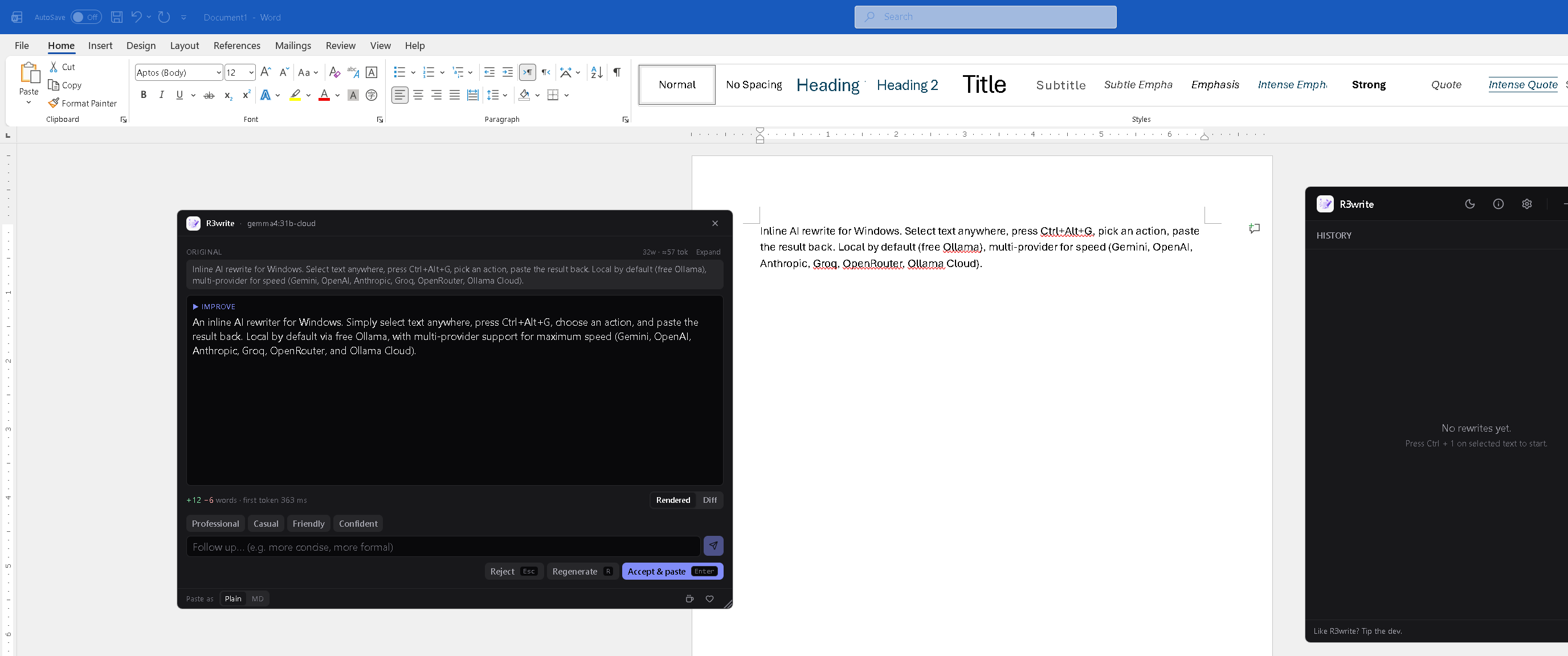
R3write popup mid-rewrite over a Word document, with the streamed Improve rewrite, +12 -6 words / first-token latency stats, follow-up tone chips, and accept / regenerate / reject pills

Select text in Word, the popup streams an Improve rewrite, you press Enter. Every keystroke without leaving the source app.

Inline, not a tab

No window-switching. The rewrite happens where you're already typing.

Free by default

Local Ollama is the zero-cost path — no key, no quota, no network.

Bring your own key

Cloud providers use your own API key, stored per-provider in Windows Credential Manager.

Word-level diff

See exactly what changed every time. Green additions, red deletions, on the same surface.

What's in it

One hotkey, any app

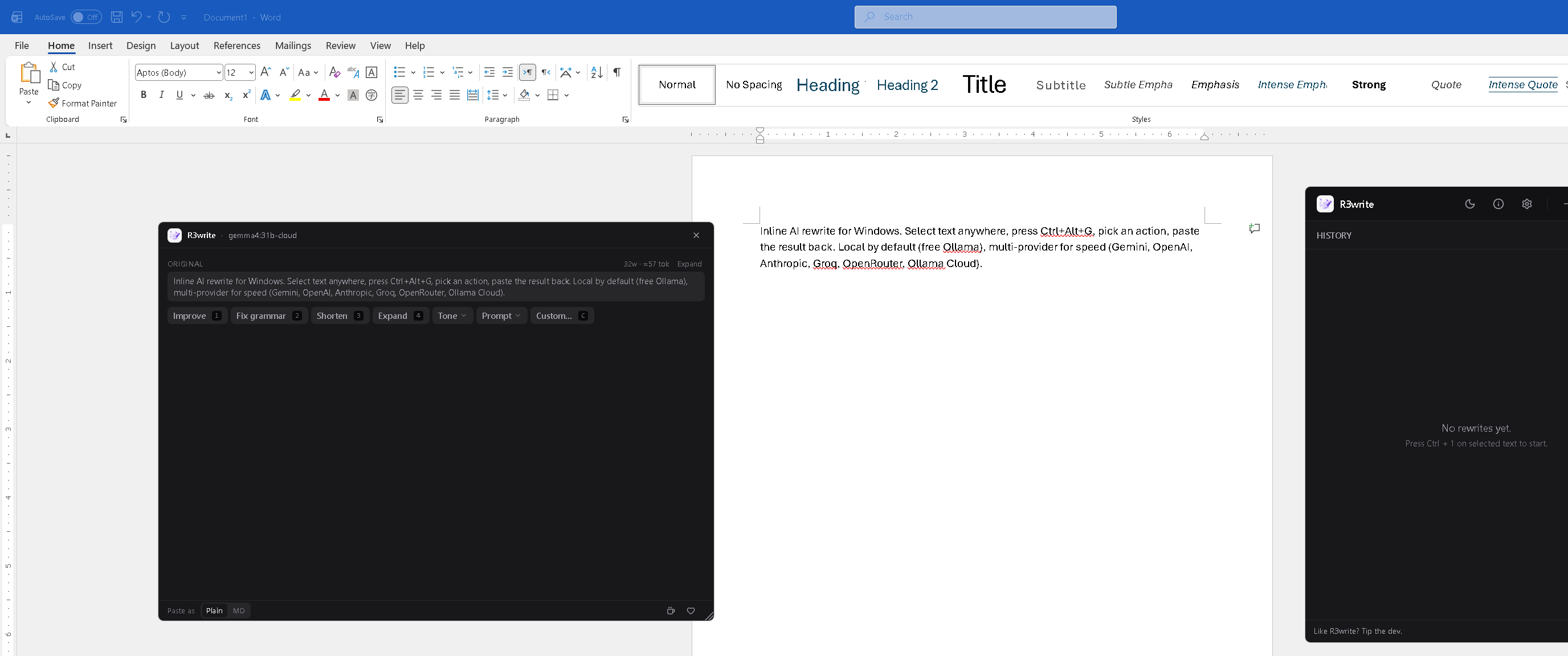
Word, Slack, browsers, code editors, terminals — anywhere there's text. The popup opens at your cursor with Improve, Fix grammar, Shorten, Expand, Tone, Prompt, and Custom actions. Each has a numeric shortcut (14, C) so you never need the mouse.

Repeat the same action on a new selection with Ctrl+Alt+Shift+G — no picker.

The popup action picker with all seven chips visible

Word-level diff

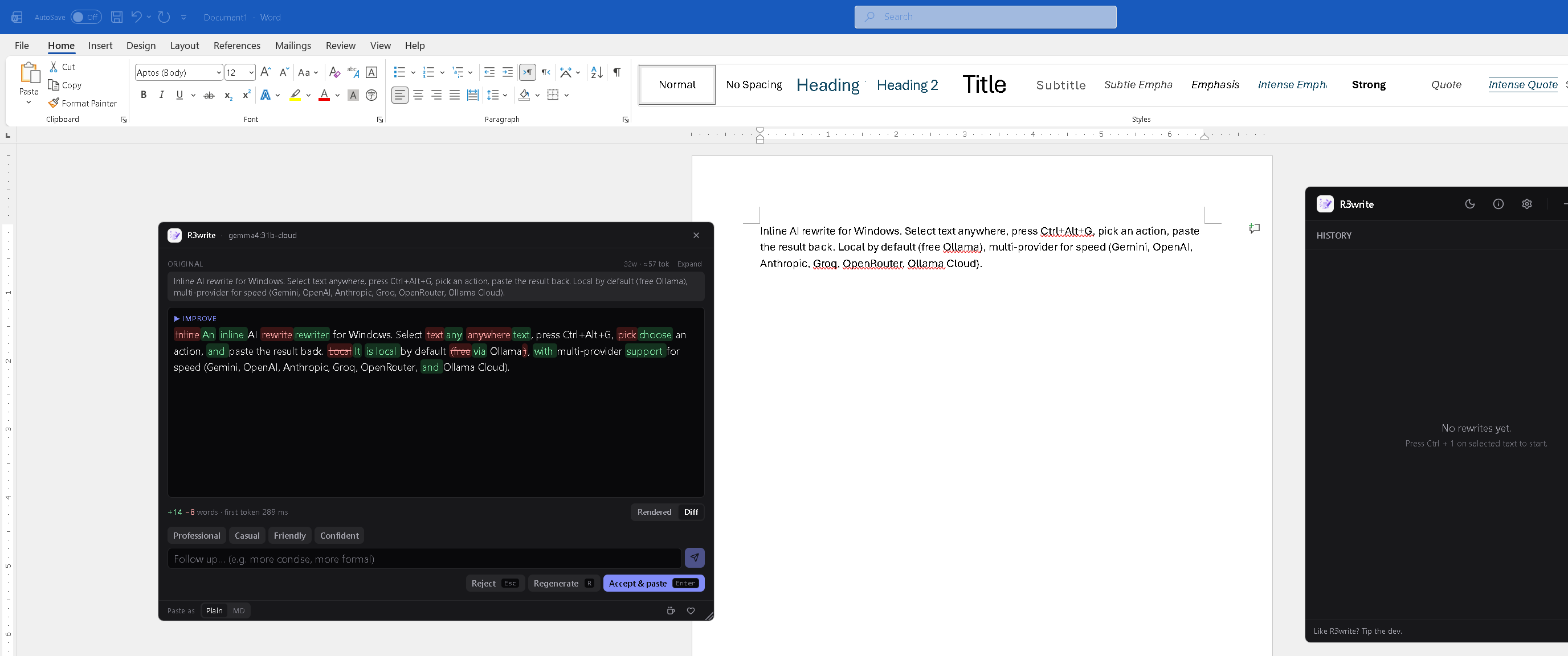
Toggle the rewrite into Diff view to see exactly what changed: green for additions, red strike-through for deletions, with a running +N -M words tally and the first-token latency.

Sanitised for both light and dark themes. Same surface as the rewrite — no extra panel, no separate compare view.

The popup in Diff view showing green word additions and red strike-through deletions

Your providers, your keys

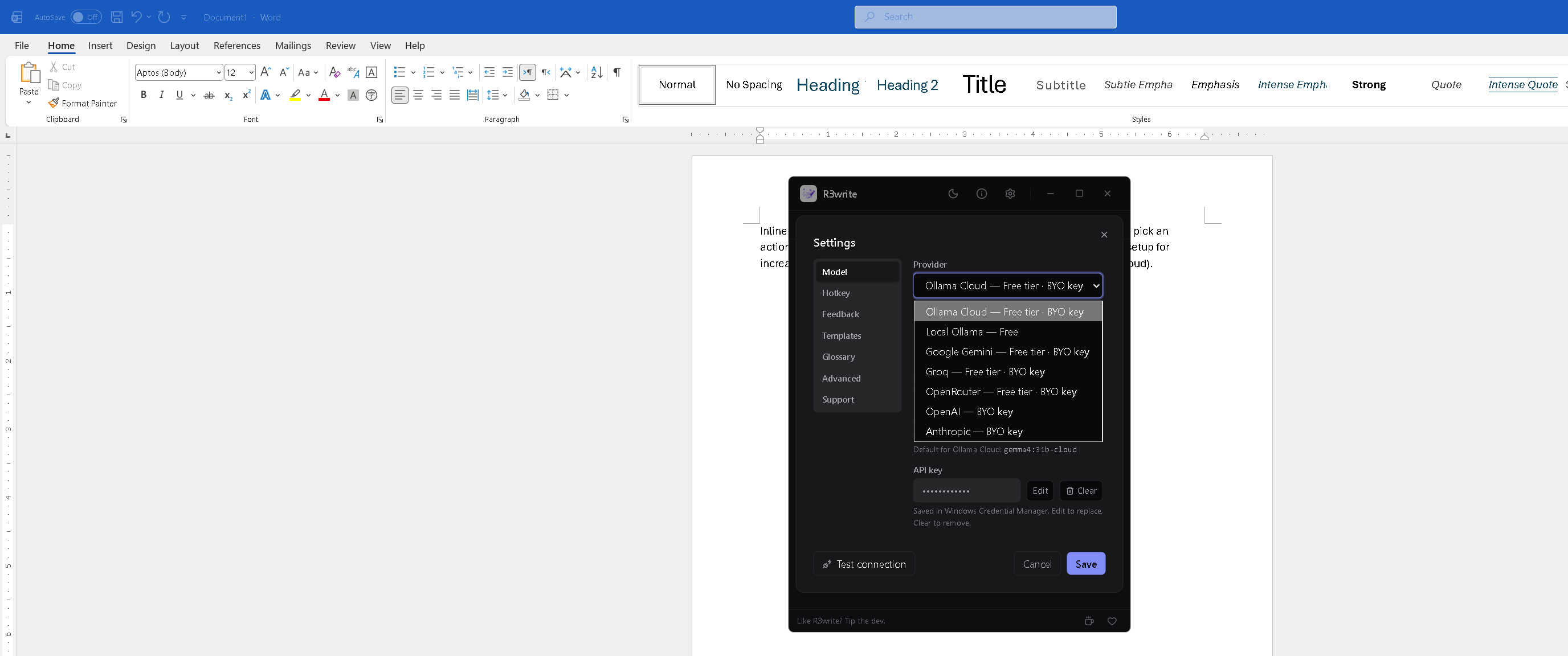
Switch the active model from a single picker. Free options up top, paid below. Each provider has its own keyring entry — switching providers doesn't blow away the others' keys.

A live status pill in the header polls the active provider every 60 s. Green when reachable, red when not.

Settings dialog with the Provider dropdown open showing all seven providers and their tier tags

History at a glance

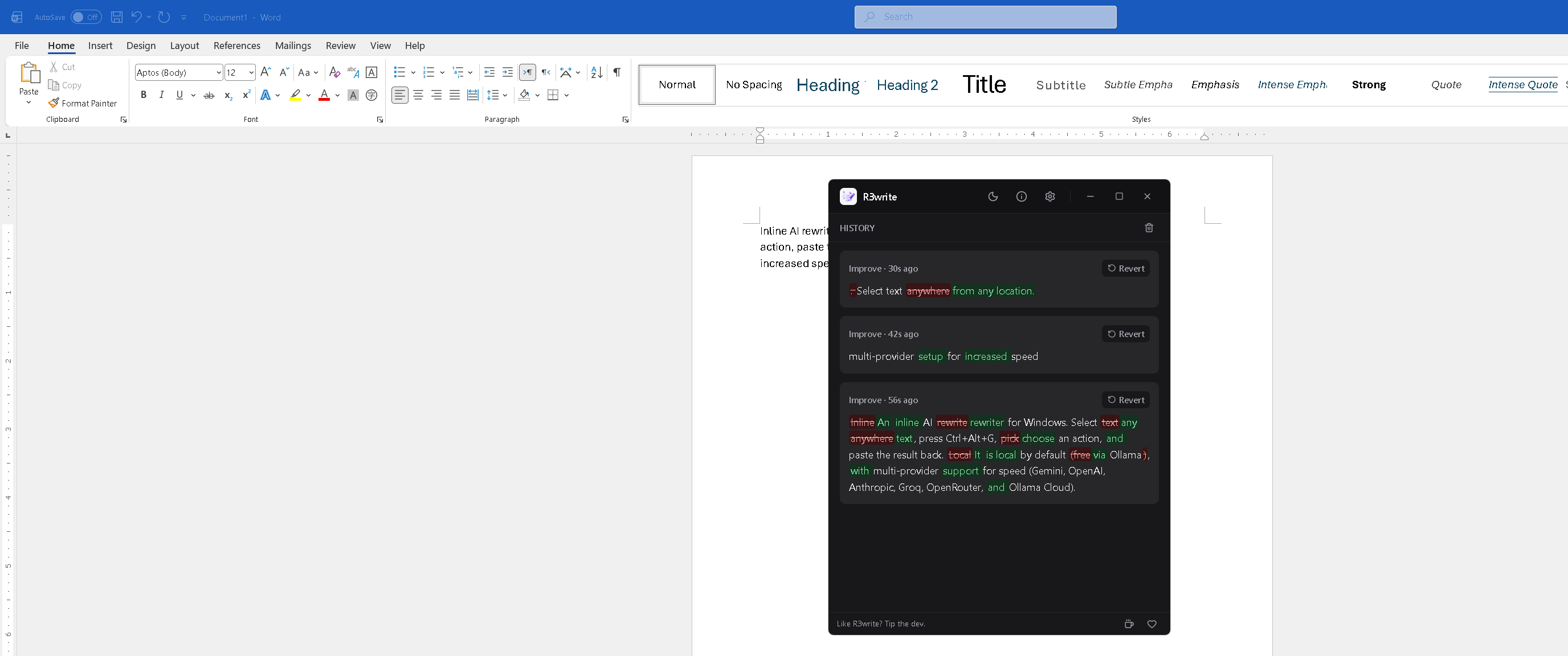
Last 20 rewrites, each with the action, time, word-level diff, and a one-click Revert (copies the original back to your clipboard for paste-over).

Closing the main window keeps R3write running in the system tray so the global hotkey still fires.

The main window history list with three Improve rewrites and rich diff highlighting

Pick a provider

Default for new installs is Ollama Cloud. Switch anytime in Settings → Model. Legacy cloud / local settings from earlier versions migrate automatically.

Provider Tier Default model Notes
Local Ollama Free llama3.2 Runs on your machine, no key required.
Ollama Cloud Free tier · BYO key gemma4:31b-cloud Default for new installs.
Google Gemini Free tier · BYO key gemini-2.5-flash Most generous free tier of any major cloud LLM; very fast.
Groq Free tier · BYO key llama-3.3-70b-versatile Fastest streaming token rate.
OpenRouter Free tier · BYO key anthropic/claude-sonnet-4 Aggregator; many models behind one key.
OpenAI BYO key gpt-4.1-mini Paid only.
Anthropic BYO key claude-sonnet-4-6 Paid only.

About R3write

R3write started as a personal itch: every time I wanted to clean up a paragraph, tighten a Slack message, or rewrite a sentence I'd just typed, I'd Alt+Tab into a chatbot, paste, copy the response, switch back, and lose my train of thought. That tab-switching tax adds up — and for the small rewrites I do constantly, a 30-second chat is overkill.

R3write replaces the tab switch with a hotkey. Select text in any app, press Ctrl+Alt+G, pick an action, paste back. The rewrite happens where you're already typing.

Principles

  • Local by default. The free path uses Ollama on your machine. No network, no key, no quota.
  • Bring your own key. Every cloud provider uses your API key directly. R3write doesn't proxy anything through its own server. There is no R3write server.
  • No telemetry. R3write doesn't phone home, doesn't track usage, doesn't collect analytics.
  • Your data stays where you put it. Selections go to the provider you configured. That's it.

Get started in 30 seconds

  1. Download R3write from GitHub and run the installer.
  2. Grab a license key at the Lemon Squeezy checkout (pay what you want, $5 min) — the in-app gate has a one-click link.
  3. Paste the key on first launch to activate; then set up a provider (default Ollama Cloud, free tier).
  4. Select text in any app, press Ctrl+Alt+G, pick an action, accept & paste.

Or build from source

git clone https://github.com/drknowhow/R3write
cd R3write
npm install
npm run tauri:dev

Prereqs: Windows 10/11 · Node ≥ 20 · Rust stable + MSVC Build Tools · WebView2.